
Splittr — by TrustGraphed Systems Private Limited
Shared money gets weird. Splittr keeps it simple.
Split. Settle. Simple. Splittr records shared costs, balances and settlements for couples, flatmates, trips and friends — so nobody has to do spreadsheet math at midnight.
Android v1.0.0 is feature-complete; the store release isn't submitted yet. You'll find honest status here — never a fake download button.
- Add it
- Split it
- Settle it
MONEY MAKES THINGS WEIRD.
Split the money. Keep the vibe.
The Split
Every group has that one conversation.
Pick a scene you've lived through. The quotes are jokes about situations — never about the person who owes. We've all been the person who owes.
How it works
Add it. Split it. Settle it.
Five steps between “we'll sort it later” and actually sorted. Splittr never holds or moves money — settlements happen wherever you already pay people.
Create or join a Circle
One shared ledger per group. Invite people with a secure link or QR code — named, never silent.
Add a shared expense
Manual entry on purpose: amount, payer, done. Attach a bill photo as evidence if you like. No OCR.
Choose who and how
Pick participants, split equally or set exact amounts. Recurring bills work the same way.
See who owes whom
Exact balances in integer minor units. No rounding drift, no “roughly”, no mental math.
Settle elsewhere
Pay people however you already do, then mark it settled. The history stays preserved forever.
Product proof
Real features. Real screenshots.
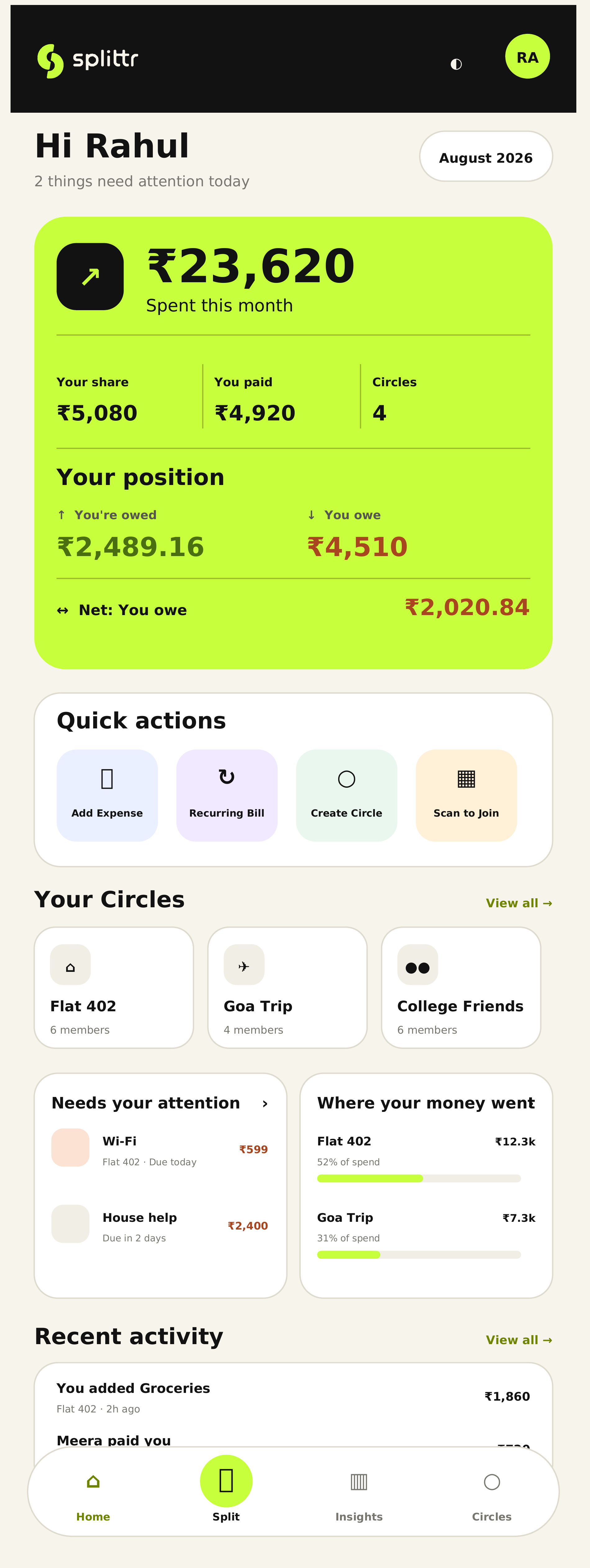
The Android MVP is feature-complete and frozen. Every screen below is a real capture of that build — Home, Circles, Invite Members, Add Expense, Edit Split, Notifications and Profile & Settings. No design mockups dressed up as the app.
Your whole position, one screen
Monthly spend, your share, what you paid and where you stand across every Circle — without opening a spreadsheet.
Quick actions, the bills that need attention and recent activity all sit on the same screen, so nothing gets discovered three weeks late.
- Spend and position at a glance
- Quick actions for the common jobs
- Recent activity across Circles
Use cases
Whoever you split with, the math stops being personal.
Couples
Rent, groceries, “I'll get the next one.” A running balance ends the quiet scoreboard neither of you admits to keeping.
Flatmates
Recurring bills with everyone's name on them. The Wi-Fi stops being one person's unpaid side job.
Trips
Log it when it happens — taxis, prawns, museum tickets — and settle once at the end instead of auditing the whole week.
Friends
Dinners, gifts, match tickets. Split equally or exactly, and keep the group chat for memes instead of math.
Families & households
Shared household costs without a spreadsheet maintained by the one responsible adult. Everyone sees the same numbers.
Same app. Same math. Less weird.
One Circle per group — your flat, your trip, your relationship.
Trust
A money app that never touches money.
Splittr is social-first, financial-second. It keeps score so friendships don't have to — and it never touches your money, your bank or your UPI. Your address book stays on your phone.
No money custody
Splittr records who paid and who owes. It never holds, moves or processes money — settlements are payments you make elsewhere, in whatever app you already use.
Exact math, always
Splits are computed in integer minor units — the smallest unit of the currency — so balances are precise and never drift by rounding.
Contextual permissions
Camera is asked for only when you scan an invite QR code or attach bill evidence. Notifications exist for reminders. Nothing preemptive. Splittr never requests device contacts access.
Contacts stay private
Invites work through secure links and QR codes, manual named pending participants, and Splittr Contacts from past Circles. Splittr never requests, reads, syncs or uploads your phone address book.
Photos are evidence, not data mines
A bill photo is stored as evidence for the people in that Circle. There's no OCR and no line-item extraction running on it.
A real exit
Account deletion is in settings, written in plain language. Leaving a money app shouldn't require a support ticket and a prayer.
FAQ
Straight answers, no asterisks.
Including the uncomfortable ones about money, pricing and launch dates.
One last thing
The group chat has suffered enough.
Split the money. Keep the vibe. Add it. Split it. Settle it.